


Table of Contents
-
Where Secure Email For Small Business Breaks Down In Daily Workflows
-
How Email Security For Small Business Reduces Preventable Disruption
-
Building Small Business Email Security Around People And Permissions
-
Strengthening Secure Email For A Small Business With Reviews And Recovery Planning
-
Choose Email Security Support That Protects Your Business Without Locking You In
Email is where money, access, and trust move every day. Vendor payment requests, password resets, customer documents, and shared inboxes all depend on it. That is why email security for small businesses is tied to cash flow, productivity, client trust, and compliance workflows.
Small businesses receive the highest rate of targeted malicious emails at 1 in 323, so small business email security needs to be practical, understandable, and built around how work actually gets approved.
Jason Harlam, Business Development Manager at Tech Advisory Group, notes: “The best email protection starts with knowing which messages can move money, expose client data, or change access, then building controls around those workflows.”
Why Business Email Security Belongs In Your Operating Plan
Email protection affects payment approvals, customer communication, employee productivity, and risk management. The FBI’s Internet Crime Complaint Center reported that business email compromise alone generated $3 billion in losses in 2024, which makes the approval chain worth managing as part of your operating plan, not as an IT afterthought.
-
Fewer recurring tickets: Better filtering reduces spam complaints, suspicious-email reports, and repeat help desk requests.
-
Cleaner approval workflows: Finance can verify vendor changes before invoices are paid or ACH details are updated.
-
Stronger user confidence: Employees know when to report, pause, or request manager approval.
-
Better risk visibility: Leadership sees patterns across alerts, tickets, user behavior, and maintenance.
Useful capability areas include advanced threat protection, spam filtering, phishing detection, setup, configuration, and troubleshooting.
Where Secure Email For Small Business Breaks Down In Daily Workflows
A finance manager receives an invoice update from a familiar vendor, opens the attachment on a phone, and forwards it to a shared accounts payable mailbox. Risk rises when inbox rules, mobile access, shared mailboxes, and permissions are not reviewed on a regular schedule.
Attachments deserve special attention because a significant bulk of emails with attachments received by organizations were malicious. A misdirected quote, payroll file, or customer form can also expose data if business email security controls do not match the workflow.
That is where phishing detection, spam filtering, configuration support, and troubleshooting need to work together. Customized controls help prevent delayed approvals, misdirected payments, exposed customer information, and avoidable manager follow-up.
|
Workflow checkpoint |
Operational control to add |
Owner or handoff |
Failure prevented |
|---|---|---|---|
|
Vendor bank-detail change request |
Require callback verification using the vendor master record before payment approval |
Accounts Payable hands off to Finance Manager |
ACH payment sent to a spoofed account |
|
Shared billing inbox access |
Review mailbox delegates monthly and remove unused access |
Office Manager requests changes; IT updates permissions |
Customer invoice attachments viewed by unauthorized users |
|
Mobile email on personal devices |
Apply device PIN, remote wipe, and conditional access rules |
Manager confirms need; IT help desk enrolls device |
Exposed mailbox data after a lost phone |
|
Password reset or payroll update email |
Route high-risk requests to a ticketing system with identity verification |
HR or Payroll submits ticket; IT validates requester |
Account takeover from a fraudulent reset request |
|
Department-specific email training |
Schedule phishing simulations for Finance and HR |
Security provider prepares scenarios; managers review reports |
Repeated time loss from avoidable phishing escalations |
How Email Security For Small Business Reduces Preventable Disruption
Better email controls reduce interruptions across finance, operations, HR, and customer service by making the next action clear when a suspicious message, odd mailbox rule, or questionable payment request appears.
-
Cleaner inboxes reduce ticket noise: Fewer suspicious messages and spam complaints mean fewer repeat IT tickets. Scheduled maintenance keeps those issues from piling up.
-
Safer approvals protect cash flow: Invoice fraud, payment changes, and executive impersonation need verification before money moves.
-
User training improves decisions: Ongoing education helps employees question payroll requests, file links, and password resets before they become incidents.
-
Faster escalation limits exposure: When a user reports strange mailbox behavior, rapid escalation helps contain the account, review affected messages, and document what happened. We use that same practical mindset across more than 1,512 managed endpoints.
-
Backups support recovery planning: Backup management and disaster recovery planning reduce downtime when email access, files, or connected systems need restoration.
Strengthen Your SMB Security
Building Small Business Email Security Around People And Permissions
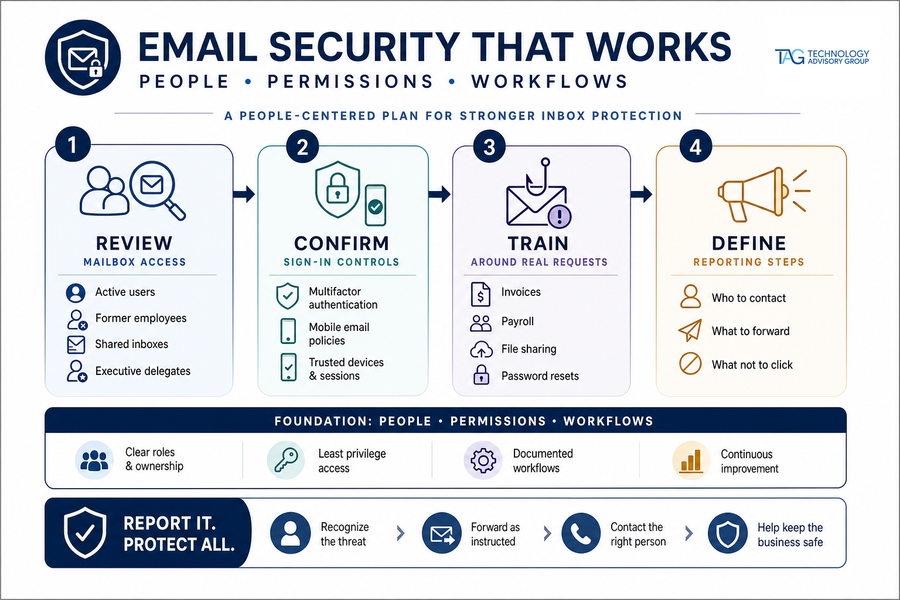
Inbox protection works best when you manage people, access rules, and business workflows together. The work matters, especially when 68% of SMBs lack DMARC policies, which makes spoofed messages harder to control.
A practical plan should connect security assessments, user training, mobile access, and leadership reporting. This is where a team approach matters: security, support, projects, and vCIO oversight should connect permissions, training schedules, road maps, and executive visibility instead of treating each issue as a separate ticket.
-
Review mailbox access: Check active users, former employees, shared inboxes, executive delegates, and accounts with access to invoices, payroll, or customer records.
-
Confirm sign-in controls: Validate multifactor authentication, mobile email policies, and access rules.
-
Train around real requests: Use examples tied to invoices, payroll updates, file sharing, password resets, and manager approvals.
-
Define reporting steps: Tell users who to contact, what to forward, what not to click, and how suspicious messages become tickets.
Strengthening Secure Email For A Small Business With Reviews And Recovery Planning
Email incidents cost more time when no one knows which systems are affected, who approves recovery, or whether recent backups are usable. Even outbound settings matter, since unlimited outbound email thresholds enabled malicious activity in almost 15% of engagements.
At Tech Advisory Group, we connect reviews, backups, disaster recovery, and business continuity so your email risk is not handled only after a ticket opens. Our process ties routine assessments, maintenance, user devices, backend servers, and cloud infrastructure into a plan leadership can prioritize.
-
Review recurring issues: Use daily, monthly, and quarterly IT and satisfaction reviews to spot patterns across tickets, users, devices, and locations.
-
Test recovery steps: Validate backups before an account compromise disrupts invoices, customer records, approvals, or operations.
-
Prioritize by road map: Use a multi-quarter IT plan to schedule fixes without overwhelming staff.
Protect Cash Flow From Email Fraud
Invoice fraud often starts in the inbox. Tech Advisory Group can help you review email risk and strengthen approval workflows.
Choose Email Security Support That Protects Your Business Without Locking You In
Many organizations delay improvements because they worry about rigid contracts, unclear invoices, or paying for services they do not need. That buying structure matters as much as the tool, especially as 79% of respondents say email security solutions with defensive AI capabilities are very important or extremely important to their cybersecurity posture in 2025.
Ask practical questions before you sign, especially if recurring IT issues, unclear handoffs, or unpredictable invoices have already slowed your team down.
-
Defined onboarding: Confirm who handles setup, configuration, troubleshooting, and ownership for open tickets.
-
Leadership review rhythm: Ask how alerts, escalations, maintenance, satisfaction, and road map priorities are reviewed.
-
Flexible pricing: Avoid one-size-fits-all packages when departments need different controls or training schedules.
-
Contract clarity: Understand opt-out terms, including a 30-day option.
-
Local support: Ask whether work stays with a 100% local team and whether you can rely on one vendor and one invoice across IT, cybersecurity, and support needs.
Talk Through Your Email Risk With Tech Advisory Group
Practical email protection gives you safer approvals, fewer avoidable tickets, better user decisions, and a clearer recovery plan when a vendor payment request, password reset, or shared mailbox issue puts work at risk. We help make complex email risks easier to understand and manage, with more than 25 years in business, more than 75 active clients, and a 100% local team serving Rhode Island, Massachusetts, Providence, Worcester, and nearby markets.
Contact Tech Advisory Group to discuss your email security needs, review current gaps, or build a customized plan that fits your users, workflows, and budget.
Explore Expert Cybersecurity Services Near You
Schedule Your Cloud Services Consultation
Ready to make a move to the cloud? TAG is ready to help with any or all cloud services from a private cloud, public cloud, or Microsoft 365 services.