


Table of Contents
You locked the front door. But did you check the side window someone propped open six months ago? That is a practical way to understand what is a security misconfiguration when your business runs on Microsoft 365, VPNs, vendors, cloud apps, and lean IT processes.
A security misconfiguration is a setting, permission, connection, or control left in an unsafe state. It usually builds through small changes, temporary access, vendor connections, and permissions no one reviewed. Unit 42 links 90% of data breaches to misconfigurations or security gaps.
Jason Harlam, Business Development Manager at Tech Advisory Group, notes: “The risk is rarely one careless click. It is the stack of old approvals, exceptions, and access paths no one owns anymore.”
What Is A Security Misconfiguration In Daily Operations
Leaders should care because misconfigured settings turn into repeat tickets, stalled approvals, staff interruptions, and uncertainty about who can access customer files.
-
Default settings remain: NSA and CISA red and blue teams identified common patterns in large organizations, including defaults left unchanged.
-
Admin rights spread: Routine staff accounts carry more authority than the job requires.
-
Alerts go unread: IBM reported security misconfiguration at 30% of observed web application risks, while DBIR cited 52% within miscellaneous errors.
-
Temporary access stays: OWASP moved it to second, up from fifth in 2021, per SecurityWeek.
That drift is common in a busy office; accountability reduces exposure. We focus reviews on assessments, firewall management, user access, and cloud baselines so recurring issues have an owner instead of becoming another ticket.
Security Misconfiguration Examples That Build Over Time
At a Rhode Island distributor, year one starts with a cloud quoting app added before a busy sales season. A vendor gets remote access for an ERP project, a manager receives temporary admin rights, and an annoying security prompt gets turned off. By year two, the project is done, but none of those changes are reversed.
These security misconfiguration examples all had a reasonable business purpose. The issue is the combined exposure left behind in vendor accounts, approval workflows, and admin permissions. Verizon ranked mis-delivery and misconfiguration as the third and fourth most common breach causes in 2020. Our vCIO process helps plan tool changes, vendor access, and permissions before small gaps compound.
|
Change Area |
Operational Checkpoint |
Who Should Review It |
Evidence to Capture |
|---|---|---|---|
|
New cloud application rollout |
Confirm SSO, MFA, user groups, data-sharing settings, and offboarding workflow before launch |
vCIO, IT administrator, department manager |
Approved access matrix, Entra ID or Google Workspace group mapping, vendor security settings export |
|
Vendor remote access |
Set project end date, restrict access to named systems, and require ticket-based reauthorization |
IT manager, project owner, vendor account lead |
VPN user list, RMM access log, signed project closeout note |
|
Temporary admin permissions |
Use time-bound elevation instead of permanent admin membership for managers or power users |
Systems administrator, HR manager, business unit leader |
Privileged access approval, role expiration date, monthly admin group screenshot |
|
Disabled security prompts |
Document the user complaint, test safer alternatives, and require approval before suppressing alerts |
Help desk lead, security owner, affected department supervisor |
Help desk ticket, conditional access policy change record, user acceptance notes |
|
Quarterly in-person review |
Compare system settings against how staff actually work, including informal workarounds and shared devices |
vCIO, onsite IT technician, office manager |
Walkthrough notes, exception register, remediation owner and due date list |
Misconfigurations Behind Real Business Exposure
The RIBridges incident is a practical Rhode Island reminder about governance, not a reason to point fingers. HIPAA Journal reported that attackers used a vendor employee’s credentials to access the benefits system VPN. Initial access occurred in July, detection happened about five months later, and data on 644,401 people was exposed.
The same reporting said the group claimed it cracked an 8-character password in about five minutes, while 397 alerts about large data transfers went unnoticed. Misconfigurations become business exposure when no one regularly reviews passwords, MFA expectations, vendor access, alerts, and ownership. We support that work through in-person reviews, full support during business hours, and emergency support on nights, weekends, and holidays.
Related Security Guides
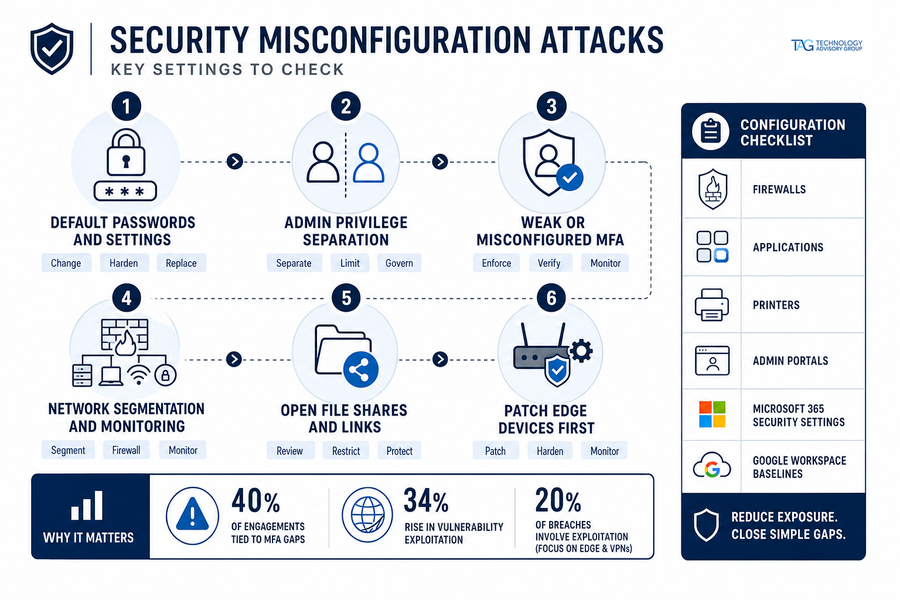
Security Misconfiguration Attacks And The Settings To Check
Security misconfiguration attacks often do not need advanced techniques when everyday settings expose access points.
-
Default passwords and settings Change vendor defaults on firewalls, applications, printers, and admin portals before staff depend on them. Unit 42 reported that over 90% of data breaches were enabled by misconfigurations or gaps in security coverage, rather than novel exploits.
-
Admin privilege separation Keep daily user accounts separate from admin accounts to reduce approval confusion and limit unnecessary access.
-
Weak or misconfigured MFA Talos tied missing MFA and unpatched or misconfigured applications to 40% of engagements.
-
Network segmentation and monitoring Use firewall management to separate accounting systems, guest Wi-Fi, servers, and vendor VPNs.
-
Open file shares and links Review Microsoft 365 security settings across Teams, SharePoint, OneDrive, Exchange Online, Defender for Office 365, Entra ID, Power BI, and Power Platform. Use CISA’s SCuBA guidance for Google Workspace baselines, too.
-
Patch edge devices first Verizon DBIR notes exploitation of vulnerabilities rose 34 percent and accounts for 20 percent of breaches, with focus on edge devices and VPNs.
These checks support proactive technology management: fewer repeat access problems, cleaner approvals, better vendor control, and less disruption when staff need systems to work on deadline. They also reflect the broader risk picture: SecurityWeek reported that Security Misconfiguration is now second on the OWASP list, and IBM reported it accounted for 30% of observed web application risk during penetration testing engagements.
Finding A Security Misconfiguration Vulnerability Before IT Spreads
Organizational change is hard because staff, vendors, and systems all need access to keep invoices, approvals, tickets, and customer handoffs moving.
-
Set the baseline: Define secure settings for devices, cloud apps, firewalls, users, and backups before exceptions pile up.
-
Document approved changes: Record who requested access, why it was approved, who approved it, and when it expires.
-
Review on schedule: Monthly, bi-monthly, or quarterly reviews catch a security misconfiguration vulnerability before drift becomes routine.
-
Remove project access: Close vendor VPNs and temporary admin rights when the work ends.
-
Fix repeat causes: Use vCIO guidance, security assessments, and a multi-quarter IT roadmap to reduce recurring tickets.
Rhode Island General Laws section 11-49.3-2 expects a risk-based information security program with reasonable security procedures and written vendor requirements for third parties handling covered data. We align review schedules and service scope to business needs, including a-la-carte options when a targeted assessment, backup review, firewall review, or access cleanup is the right next step.
Find Risky Settings Before They Spread
Misconfigurations grow quietly across users, cloud apps, firewalls, and vendors. Tech Advisory Group can help review where daily operations are exposed.
Cloud Misconfigurations Need Baselines And In-Person Reviews
Cloud dashboards show settings, but they do not show how people actually work at the front desk, loading dock, conference room, or shared office printer. An in-person review can uncover shared reception logins, vendor laptops left on the network, unmanaged file shares, old scan-to-folder paths, and informal workarounds created to meet a deadline. That is why we pair remote monitoring with pre-scheduled onsite reviews, a vCIO assigned to every client, monthly client check-ins, formal quarterly business reviews, and senior-level engineers who connect cloud misconfiguration decisions to daily operations.
That mix gives you clearer ownership and helps reduce recurring issues instead of treating every access problem as a fresh ticket.
Make Settings Reviews Part Of The Way You Operate
The issue is not one bad decision. It is derived from many reasonable changes that were never reviewed against a known good baseline, from a SharePoint link created for a customer handoff to a vendor VPN account left open after a project deadline.
Our view is straightforward: Complex problems. Simple solutions. Build reviews into normal operations, assign ownership for access and alerts, keep backups and disaster recovery aligned with real workflows, and use scheduled assessments to give leadership a clear picture of risk before the next tool, vendor, or approval process adds another exception.
Schedule a security assessment with Tech Advisory Group to find and prioritize the misconfigurations in your environment.
Explore Expert Cybersecurity Services Near You
Schedule Your Cloud Services Consultation
Ready to make a move to the cloud? TAG is ready to help with any or all cloud services from a private cloud, public cloud, or Microsoft 365 services.